Build your project plan with AIden.
AIden, KoPMo’s AI Project Builder, turns your project brief into a draft plan. Answer guided questions, generate a draft with your configured AI model, then review it before creating an editable project. The result starts as a draft, not an approved baseline.
Start freeFree workspace · AI features depend on your plan
Start with the project, not a blank schedule.
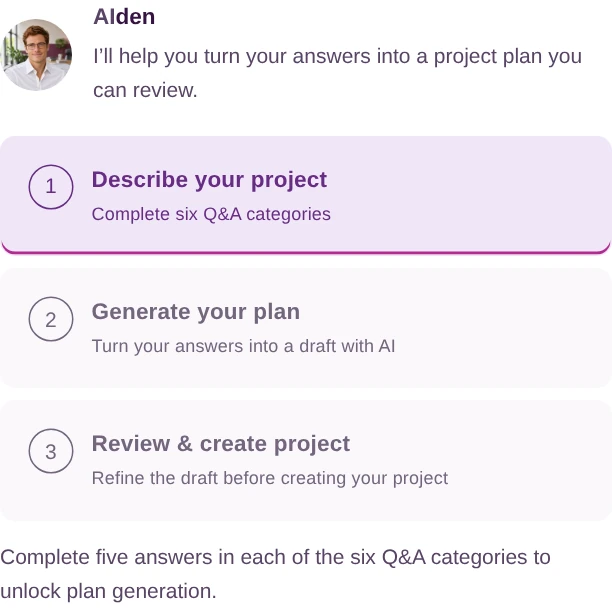
A useful plan begins with an outcome, boundaries and constraints. The guided conversation groups your answers into six planning categories. You can supply what you know, identify missing information and return to clarify your answers as the planning discussion develops.
- Outcome and scope: what should change, and what is excluded?
- Tasks and milestones: what work and deliverables are needed?
- Dates and constraints: when can work start, and what dates matter?
- People and capacity: which roles, skills and availability are required?
- Purchases and costs: what rates, expenses or purchases need confirmation?
- Risks and governance: what could disrupt delivery, and who decides?
Generate, review, then create.
The workflow separates describing the project, generating a plan and reviewing the result. AI can prepare draft scope, tasks, dates, resource assumptions, costs and risks from your answers. Review the estimates and assumptions in the draft and add clarifications before regenerating it. Creating the project from the draft does not approve or baseline the plan.
A practical example: a customer portal refresh.
Consider a fictional team refreshing a customer portal. A useful brief names the users, the pages in scope, the intended outcome, a target start date and the people available. A deadline alone does not explain how long security review, data migration or user acceptance will take. Record those uncertainties before asking the AI to build a schedule.
- Confirm the acceptance criteria for each deliverable.
- Check that dependencies describe the real order of work.
- Check each named person’s capacity and the basis of cost estimates.
- Keep unresolved decisions visible instead of treating assumptions as facts.
What the AI does not decide.
Generated plans are estimates for review. Missing evidence, incomplete answers or model errors can produce gaps or prevent generation. Review any displayed validation issues and resolve the underlying information. Accountable people still confirm scope, staffing, dates, budgets and baseline approvals. AI access depends on your plan and administrator configuration.
Discuss your project workflow
For a product walkthrough or a tailored project-management workflow, contact the KoPMo team.
agentkopmo@gmail.com